
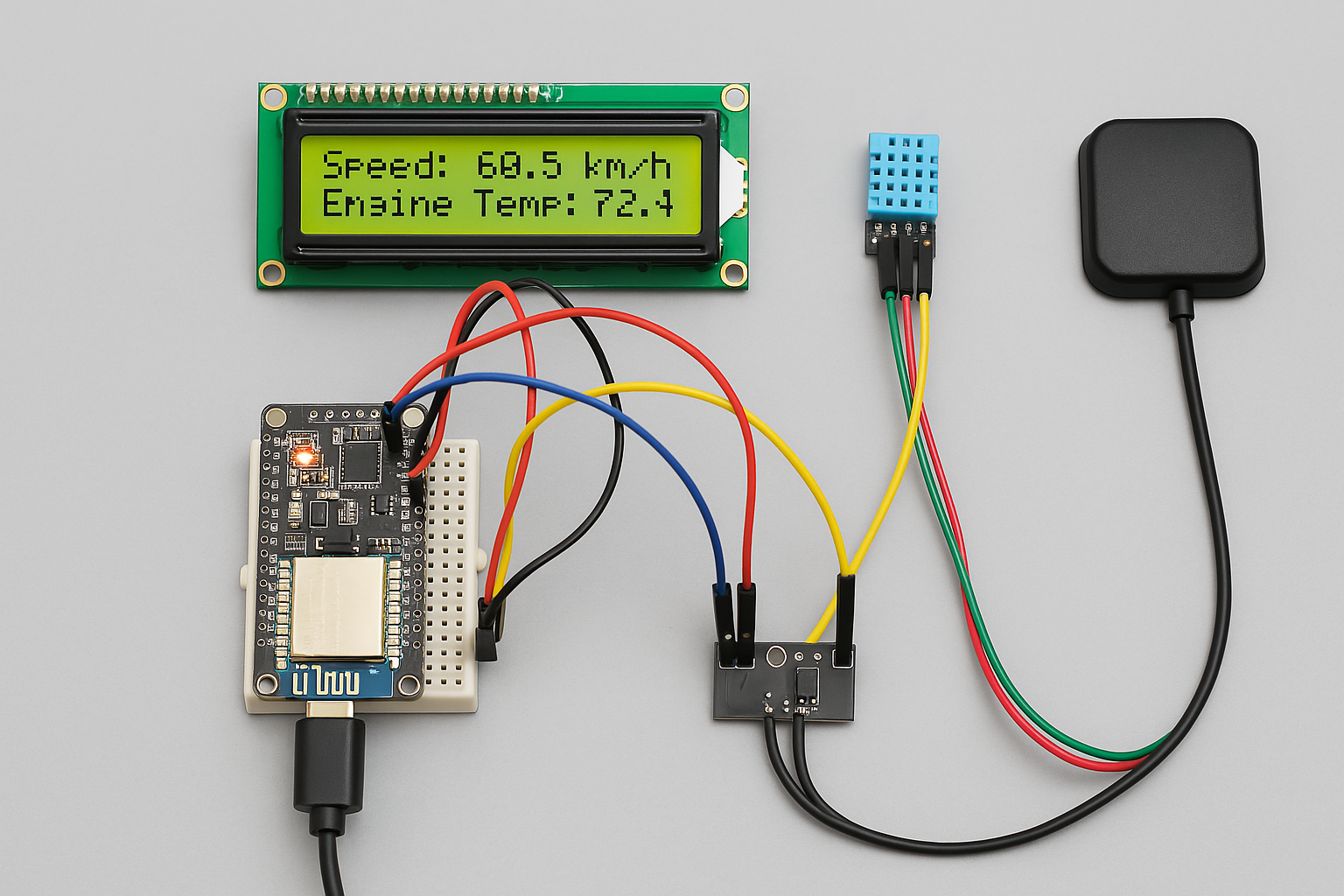
Here’s a step-by-step approach to building the IoT-Based Smart Vehicle Monitoring System using FAVORIOT, including components, REST integration with the latest FAVORIOT v2 API, and Telegram alert notifications.
Project Objective
To design a system that uses sensors to collect data such as speed and engine temperature, which is then sent to the FAVORIOT platform for real-time monitoring and analysis via a dashboard, with Telegram alerts for abnormal conditions.
Required Components
Hardware
- NodeMCU ESP8266 / ESP32 – Microcontroller with WiFi
- Engine temperature sensor – e.g., DS18B20
- Speed sensor – e.g., Hall Effect sensor or GPS module (Neo-6M)
- Power supply / Battery Pack
- LED for status indication (optional)
Connecting to FAVORIOT Platform
- Register at FAVORIOT Platform
- Create a new Device
- Retrieve:
- Device Developer ID
- API Key
- Device Access Token
Hardware Wiring
DS18B20     → GPIO D4 (ESP8266)
GPS TX      → GPIO D7 (to RX ESP8266)
VCC/GND     → 3.3V & GND of ESP8266
Full Code (Arduino IDE)
Required Libraries
#include <ESP8266WiFi.h>
#include <WiFiClientSecure.h>
#include <OneWire.h>
#include <DallasTemperature.h>
#include <SoftwareSerial.h>
#include <TinyGPS++.h>
#include <ArduinoJson.h>
WiFi and Server Setup
const char* ssid = "YOUR_SSID";
const char* password = "YOUR_WIFI_PASSWORD";
const char* apiKey = "YOUR_FAVORIOT_API_KEY";

const char* server = "https://apiv2.favoriot.com/v2/streams";
String device_developer_id = "YOUR_DEVICE_DEVELOPER_ID";

WiFiClientSecure client;
Sensor Setup
#define ONE_WIRE_BUS D4
OneWire oneWire(ONE_WIRE_BUS);
DallasTemperature sensors(&oneWire);

// GPS
SoftwareSerial gpsSerial(D7, D8); // RX, TX
TinyGPSPlus gps;
Function to Send Data to FAVORIOT
void sendToFavoriot(float temp, float speed) {
  if (client.connect("apiv2.favoriot.com", 443)) {
    String payload = "{\"device_developer_id\":\"" + device_developer_id +
                     "\",\"data\":{\"temperature\":" + String(temp) +
                     ",\"speed\":" + String(speed) + "}}";

    client.println("POST /v2/streams HTTP/1.1");
    client.println("Host: apiv2.favoriot.com");
    client.println("Content-Type: application/json");
    client.println("apikey: " + String(apiKey));
    client.print("Content-Length: ");
    client.println(payload.length());
    client.println();
    client.println(payload);
  }
}
Main
loop()
void loop() {
  sensors.requestTemperatures();
  float temperature = sensors.getTempCByIndex(0);

  while (gpsSerial.available()) {
    gps.encode(gpsSerial.read());
  }

  float speed = gps.speed.kmph();

  sendToFavoriot(temperature, speed);

  if (temperature > 90 || speed > 120) {
    sendTelegramAlert(temperature, speed);
  }

  delay(10000); // every 10 seconds
}
Telegram Notification
Steps:
- Create a bot using @BotFather on Telegram
- Copy your Bot Token
- Get your Chat ID using @userinfobot
Function to Send Telegram Alert
void sendTelegramAlert(float temp, float speed) {
  WiFiClientSecure telegramClient;
  telegramClient.setInsecure();
  String botToken = "YOUR_BOT_TOKEN";
  String chat_id = "YOUR_CHAT_ID";
  String message = "⚠️ ALERT!\nTemp: " + String(temp) +
                   " °C\nSpeed: " + String(speed) + " km/h";

  String url = "https://api.telegram.org/bot" + botToken +
               "/sendMessage?chat_id=" + chat_id + "&text=" + message;

  if (telegramClient.connect("api.telegram.org", 443)) {
    telegramClient.print(String("GET ") + url + " HTTP/1.1\r\n" +
                         "Host: api.telegram.org\r\n" +
                         "Connection: close\r\n\r\n");
  }
}
FAVORIOT Dashboard
- Log in to FAVORIOT Platform
- Go to Data Streams → Select your Device
- Create a Dashboard:
- Add Cards: for temperature and speed
- Use chart types such as Gauge or Line Chart
Suggestions for Enhancement
- Add GPS coordinates to the payload
- Save logs to Google Sheet via IFTTT
- Use battery + solar panel for real deployment
- Add a status flag for engine ON/OFF
References
- Favoriot Platform Registration (FREE and Paid)
- Favoriot Full Documentation (Official)
- Favoriot Github
- How-To Use Favoriot Platform Video Playlist
Disclaimer
This article provides a step-by-step guide but is intended only as a guideline. The source code may need adjustments to fit the final project design.




Leave a Reply